European ASP.NET 4.5 Hosting BLOG

BLOG about ASP.NET 4, ASP.NET 4.5 Hosting and Its Technology - Dedicated to European Windows Hosting Customer

European ASP.NET Core 10.0 Hosting - HostForLIFE :: Improved ASP.NET Core API Error Handling with Problem Details

clock January 28, 2026 06:38 by author Peter

Correctly managing errors is just as crucial when creating APIs in ASP.NET Core as managing successful answers. It is challenging for client apps to comprehend and handle the plain text error messages that many applications return.

Problem Details, a common and organized method of returning error information, is how ASP.NET Core tackles this issue.

Problem Details: What Are They?
RFC 7807 defines the standard error response format known as Problem Details.It offers a standard JSON structure for errors, such as:

  • HTTP status code
  • A brief title for the error
  • Detailed explanation is optional.

Problem Details are built right into ASP.NET Core.

Why Do Problem Details Matter?

Take a look at this error response:

Consider this error response:
"User not found"

This response:

  • Is not structured
  • Is hard to parse in frontend applications
  • Provides very little context

With Problem Details, error responses become clear, consistent, and easy to handle.

Simple 404 Example Using Built-in Support

For example, an API attempts to fetch a user by ID, but the user does not exist.

Controller Code :
[HttpGet("users/{id}")]
public IActionResult GetUser(int id)
{
    return NotFound();
}


Response Returned by ASP.NET Core :
{
  "type": "https://tools.ietf.org/html/rfc9110#section-15.5.5",
  "title": "Not Found",
  "status": 404
}


This approach requires no extra code, uses a standard error format, and is ideal for simple use cases

Complete 404 Example with Custom Problem Details

Sometimes, we need to give more meaningful information to the client, such as which resource was not found.

Step 1: User Model
public class UserDto
{
    public int Id { get; set; }
    public string Email { get; set; }
}

Step 2: Users Controller
[ApiController]
[Route("api/[controller]")]
public class UsersController : ControllerBase
{
    private static readonly List<UserDto> Users = new()
    {
        new UserDto { Id = 1, Email = "[email protected]" }
    };

    [HttpGet("{id}")]
    public IActionResult GetUser(int id)
    {
        var user = Users.FirstOrDefault(u => u.Id == id);

        if (user == null)
        {
            return NotFound(new ProblemDetails
            {
                Title = "User not found",
                Detail = $"User with id {id} does not exist",
                Status = StatusCodes.Status404NotFound,
                Type = "https://httpstatuses.com/404"
            });
        }

        return Ok(user);
    }
}


Step 3: API Request

GET /api/users/10
Step 4: 404 Problem Details Response

{
  "type": "https://httpstatuses.com/404",
  "title": "User not found",
  "status": 404,
  "detail": "User with id 10 does not exist"
}


This response clearly explains what went wrong, why it occurred, and which resource caused the issue. Creating aProblemDetails object manually every time is unnecessary because ASP.NET Core automatically generates them for common errors, such as 404 (Not Found) and 400 (Bad Request). You should only create a custom ProblemDetails object when you need to provide additional clarity or specific metadata for an issue.

Conclusion

In this article we have seen, how Problem Details provides a clean, standard, and beginner-friendly way to handle errors in ASP.NET Core APIs.
Developers can rely on the framework’s default behavior and customize error responses only when needed. Hope you enjoy reading this.


European ASP.NET Core 10.0 Hosting - HostForLIFE :: Common Dependency Injection Errors in Scrutor and How to Prevent Them

clock January 22, 2026 11:26 by author Peter

Scrutor is an effective addition to the Dependency Injection (DI) container that comes with.NET. Without taking the place of the default DI system, it makes assembly scanning, convention-based registration, and decorator support possible. Scrutor greatly saves boilerplate, but if used carelessly, it also adds indirection that can conceal architectural issues. The majority of Dependency Injection problems encountered in practical applications are not caused by Scrutor per se, but rather by excessively expansive scanning rules, ambiguous lifetimes, or hard-to-understand implicit registrations.

Using real-world, production-focused examples, this article examines the most frequent Dependency Injection errors while using Scrutor and discusses how to avoid them.

1. Over-Scanning Assemblies
The problem
builder.Services.Scan(scan =>
    scan.FromApplicationDependencies()
        .AddClasses()
        .AsImplementedInterfaces()
);


Why does this cause issues?
Scanning all application dependencies registers every discoverable class, including framework and third-party types. This makes the DI container unpredictable, slows application startup, and creates behavior that is difficult to debug and reason about.

The correct approach
Scan only assemblies you own and apply strict filters.
builder.Services.Scan(scan =>
    scan.FromAssemblyOf<IApplicationService>()
        .AddClasses(c => c.AssignableTo<IApplicationService>())
        .AsImplementedInterfaces()
        .WithScopedLifetime()
);

Assembly scanning should always be deliberate and narrowly scoped.

2. Accidental Multiple Interface Registrations
The problem
public class UserService :
    IUserService,
    IApplicationService,
    IDisposable
{
}


.AsImplementedInterfaces()
This registers every implemented interface, including interfaces that were never meant to be resolved from the container.

Why this is dangerous?
Unintended registrations can override other services and introduce subtle bugs that appear only at runtime.

The correct approach
Be explicit when registering services that implement multiple interfaces.
.AddClasses(c => c.AssignableTo<IApplicationService>())
.As<IUserService>()
.WithScopedLifetime()


Automatic interface registration should be used only when the intent is clear and controlled.

3. Lifetime Mismatch (Captive Dependency)

The problem
services.AddSingleton<ReportService>();
services.AddScoped<AppDbContext>();


public class ReportService
{
    public ReportService(AppDbContext context) { }
}


Why this breaks applications?
A singleton capturing a scoped dependency leads to memory leaks, invalid object lifetimes, and runtime exceptions under load.

The correct approach
Align lifetimes so that dependencies live at least as long as their consumers.
services.AddScoped<ReportService>();

Alternatively, use factory abstractions such as IDbContextFactory .

4. Hidden Decorators and Execution Order Confusion
The problem

services.Decorate<IUserService, LoggingUserService>();
services.Decorate<IUserService, CachingUserService>();


What actually happens?
The runtime execution order becomes:
Caching -> Logging -> UserService

Why this is confusing?
Decorators are invisible at injection sites, and the execution order is not obvious. Changing the registration order can silently alter application behavior.

The correct approach
Register decorators together, document their order, and add constructor logging in development to make resolution explicit.
public LoggingUserService(...)
{
    Console.WriteLine("Logging decorator created");
}


Decorator order should always be intentional.

5. Mixing Manual and Scrutor Registrations
The problem
services.AddScoped<IUserService, UserService>();

services.Scan(scan =>
    scan.FromAssemblyOf<IApplicationService>()
        .AddClasses(c => c.AssignableTo<IApplicationService>())
        .AsImplementedInterfaces()
);


Why this leads to bugs?
The .NET DI container follows a last-registration-wins strategy. Mixing manual and scanned registrations makes behavior unpredictable and environment-dependent.

The correct approach
Use one registration strategy per layer. Scrutor is well-suited for application services and repositories, while manual registration should be reserved for infrastructure and framework services.

Consistency is more important than flexibility.
6. Not Validating Dependency Injection at Startup
The problem
Dependency Injection errors surface only at runtime, often under load.

The correct approach
Enable DI validation during application startup.

builder.Host.UseDefaultServiceProvider(options =>
{
    options.ValidateScopes = true;
    options.ValidateOnBuild = true;
});


This configuration catches missing registrations, circular dependencies, and lifetime mismatches early.

7. Business Logic Inside Decorators
The problem

public class AuthorizationDecorator : IUserService
{
    public async Task DeleteUser(int id)
    {
        if (!IsAdmin())
            throw new UnauthorizedAccessException();

        await _inner.DeleteUser(id);
    }
}


Why this is a design flaw?
Decorators should not contain business rules. Hiding business logic inside decorators makes behavior harder to understand, test, and maintain.

The correct approach
Decorators should handle technical cross-cutting concerns such as logging, caching, validation, or metrics. Business rules should remain in the core service.

8. Overusing Singleton Services
The problem

services.AddSingleton<UserService>();


Why this causes problems?
Singletons introduce shared mutable state, thread-safety issues, and test instability. Many services do not need to live for the entire lifetime of the application.

The correct approach
Default to scoped services unless there is a clear and justified reason to use a singleton.
services.AddScoped<IUserService, UserService>();

Singletons should be rare and stateless.

9. Service Locator Usage in Minimal APIs
The problem

app.MapGet("/users", (IServiceProvider provider) =>
{
    var service = provider.GetRequiredService<IUserService>();
});


Why this is harmful?
Manually resolving services hides dependencies and reintroduces the service locator anti-pattern, making the code harder to test and reason about.

The correct approach
Let the framework inject dependencies directly.
app.MapGet("/users", (IUserService service) =>
{
    return service.GetAll();
});


Mental Model to Remember
Scrutor reduces boilerplate, but it also hides complexity. If your DI configuration is difficult to explain, difficult to debug, or behaves differently across environments, your scanning rules are too permissive.

Key Takeaway
Scrutor is not inherently dangerous. Uncontrolled conventions are. When used with tight assembly scanning, clear lifetimes, explicit intent, and proper validation, Scrutor becomes a powerful tool for building clean, scalable Dependency Injection in .NET. Happy Coding!


European ASP.NET Core 10.0 Hosting - HostForLIFE :: Knowing ASP.NET Core Middleware: The Request Pipeline's Heart

clock January 20, 2026 07:09 by author Peter

Middleware is a crucial component of ASP.NET Core, which is renowned for its excellent performance, modularity, and adaptability. In ASP.NET Core applications, middleware creates the request-response pipeline. Middleware is an essential topic for any.NET Core developer since every HTTP request and response passes through this pipeline.


What Is Middleware in ASP.NET Core?
Middleware is a software component that:

  • Handles HTTP requests and responses
  • Can inspect, modify, or short-circuit requests
  • Is executed sequentially in a pipeline

Each middleware component can:

  • Process the request
  • Call the next middleware
  • Process the response

Think of middleware as checkpoints that every request must pass through.

ASP.NET Core Request Pipeline
When a request hits an ASP.NET Core application:

  • It enters the middleware pipeline
  • Each middleware runs in the order it is registered
  • The response flows back in reverse order

Request → Middleware 1 → Middleware 2 → Middleware 3 → Controller
Response ← Middleware 1 ← Middleware 2 ← Middleware 3


The order of middleware registration is extremely important.

Common Built-in Middleware

ASP.NET Core provides several built-in middleware components:

MiddlewarePurpose
UseRouting Matches incoming requests to routes
UseAuthentication Authenticates users
UseAuthorization Authorizes users
UseEndpoints Executes matched endpoints
UseExceptionHandler Global exception handling
UseStaticFiles Serves static files

Example pipeline in Program.cs:

var builder = WebApplication.CreateBuilder(args);
var app = builder.Build();

app.UseExceptionHandler("/error");
app.UseHttpsRedirection();
app.UseStaticFiles();

app.UseRouting();
app.UseAuthentication();
app.UseAuthorization();

app.MapControllers();
app.Run();

Types of Middleware
1. Inline Middleware
Defined directly using Use or Run.
app.Use(async (context, next) =>
{
    // Before next middleware
    await context.Response.WriteAsync("Before Middleware\n");

    await next();

    // After next middleware
    await context.Response.WriteAsync("After Middleware\n");
});

2. Terminal Middleware
Does not call the next middleware.
app.Run(async context =>
{
    await context.Response.WriteAsync("Request handled here.");
});

Once Run() is executed, the pipeline stops.

3. Custom Middleware

For reusable and clean code, create custom middleware.

Step 1: Create Middleware Class
public class RequestLoggingMiddleware
{
    private readonly RequestDelegate _next;

    public RequestLoggingMiddleware(RequestDelegate next)
    {
        _next = next;
    }

    public async Task InvokeAsync(HttpContext context)
    {
        Console.WriteLine($"Request: {context.Request.Method} {context.Request.Path}");
        await _next(context);
    }
}


Step 2: Register Middleware
app.UseMiddleware<RequestLoggingMiddleware>();

Short-Circuiting the Pipeline

Middleware can stop further execution:

app.Use(async (context, next) =>
{
    if (!context.User.Identity.IsAuthenticated)
    {
        context.Response.StatusCode = StatusCodes.Status401Unauthorized;
        return;
    }

    await next();
});

This technique is commonly used in:

  • Authentication
  • Authorization
  • Rate limiting

Best Practices for Middleware

  • Register middleware in the correct order
  • Keep middleware lightweight
  • Use custom middleware for reusable logic
  • Avoid heavy business logic in middleware
  • Prefer exception-handling middleware at the top
  • Don’t perform long-running tasks
  • Don’t ignore async/await

Middleware vs Filters

MiddlewareFilters
Works on HTTP level Works on MVC level
Applies globally Applies to controllers/actions
Runs before routing Runs after routing

Use middleware for cross-cutting concerns like logging, security, and error handling.

Conclusion
Middleware is the backbone of ASP.NET Core. Understanding how it works empowers developers to:

  • Build secure applications
  • Improve performance
  • Implement clean cross-cutting concerns

Mastering middleware means mastering the ASP.NET Core request pipeline.


European ASP.NET Core 10.0 Hosting - HostForLIFE :: What Are ASP.NET Core Metapackages and How Are They Used Today?

clock January 12, 2026 09:37 by author Peter

In ASP.NET Core, metapackages are NuGet packages that combine several related libraries and dependencies into one package, facilitating quicker and easier application setup. Developers may refer to a single metapackage, which would automatically include everything required to execute a whole online application, rather than dozens of separate ASP.NET Core and Entity Framework Core packages.


Upon the release of ASP.NET Core 2.0, the main illustration of a metapackage was:

Microsoft.AspNetCore.All

This metapackage bundles:

  • All ASP.NET Core libraries (MVC, Razor, Identity, Routing, Logging, CORS, Authentication, SignalR, etc.)
  • All Entity Framework Core packages
  • Required third-party dependencies used internally by the framework

This approach significantly simplified project configuration and reduced deployment complexity. In addition, because much of the metapackage's contents were stored in the ASP.NET Core Runtime Store, applications benefited from smaller publish output sizes and faster startup times, since shared assets were pre-compiled.

How Things Changed in Modern .NET (.NET Core 3.0 → .NET 10)?

Beginning with ASP.NET Core 3.0 — continuing through .NET 6, .NET 8, .NET 9, and .NET 
10 — Microsoft moved away from explicit metapackages in project files.

Instead of installing a package such as Microsoft.AspNetCore.All, modern ASP.NET Core apps now rely on:

  • Shared Frameworks
  • Implicit Framework References
  • SDK-based dependency bundling

This means that when you create a project like:

<Project Sdk="Microsoft.NET.Sdk.Web">
  <PropertyGroup>
    <TargetFramework>net10.0</TargetFramework>
  </PropertyGroup>
</Project>


You automatically get all ASP.NET Core libraries — MVC, Razor Pages, Minimal APIs, Identity, EF Core — without manually referencing any metapackage. The SDK and runtime ensure consistent versions, improved performance, smaller output, and simplified .csproj configuration

Why Microsoft Made This Change?

Microsoft retired explicit metapackages because modern .NET offers:

BenefitExplanation
Cleaner project files No more long lists of NuGet references
Better version compatibility Framework assemblies all match the runtime version
Smaller deployment Shared framework assemblies are not copied to publish output
Cloud-friendly deployment Lighter, faster Docker images and containers

Summary

Metapackages played an important role in ASP.NET Core’s early ecosystem by simplifying package management, but in .NET 10, their job is now handled automatically by the .NET Shared Framework and SDK tooling. Developers get a modern, lightweight, faster development model without needing to manage NuGet dependencies manually.


European ASP.NET Core 10.0 Hosting - HostForLIFE :: ASP.NET Core's Cloud and Container-Ready

clock January 9, 2026 06:58 by author Peter

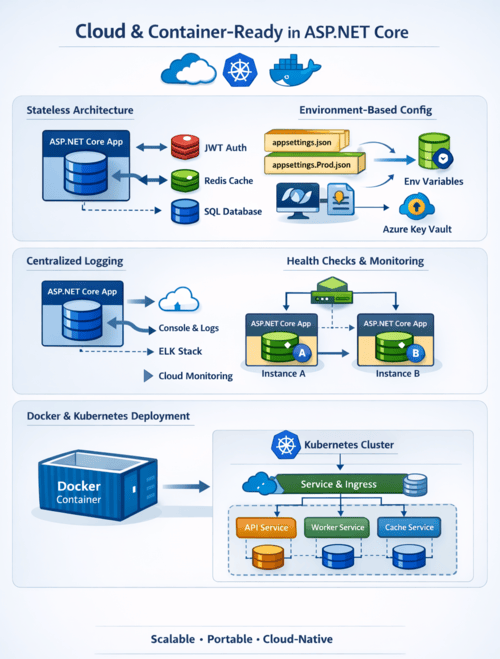
Modern application development has shifted decisively toward cloud native architectures. Applications are expected to be portable, scalable, resilient, and easy to deploy across multiple environments. ASP.NET Core was designed from the ground up with these goals in mind, making it cloud-ready and container first by default.

This article explores how ASP.NET Core enables cloud and container readiness, covering stateless design, configuration, logging, health checks, Docker support, and Kubernetes friendliness, along with real world code examples.

What Is Meant by "Cloud and Container-Ready"?
The following traits are usually present in an application that is prepared for the cloud and containers:

  • Architecture without statues
  • Externalized setup
  • Behavior depends on the environment
  • Organized logging
  • Monitoring of health
  • Quick startup and minimal memory usage
  • Simple containerization

All of these ideas are naturally aligned with ASP.NET Core.
Lightweight, Cross-Platform Runtime
ASP.NET Core runs on .NET, which is:

  • Cross-platform (Windows, Linux, macOS)
  • High-performance
  • Optimized for low memory usage
  • Fast startup (critical for containers)

This makes ASP.NET Core an excellent choice for Docker containers, Kubernetes, and serverless platforms like Azure App Service or AWS ECS.

Stateless by Design
Cloud platforms scale applications horizontally by creating multiple instances. ASP.NET Core encourages stateless applications, meaning no session data or state is stored in memory.

Avoid In-Memory Session State
❌ Not cloud-friendly:
services.AddSession();

✅ Cloud-ready approach:
Store state in Redis

  • Use JWT tokens
  • Persist data in databases
  • Example: JWT-Based Authentication

builder.Services.AddAuthentication("Bearer")
    .AddJwtBearer(options =>
    {
        options.Authority = "https://auth.example.com";
        options.Audience = "api";
    });

This allows any container instance to handle any request.

Environment-Based Configuration

ASP.NET Core uses a layered configuration system, ideal for cloud deployments.

Supported Configuration Providers

  • appsettings.json
  • appsettings.{Environment}.json
  • Environment variables
  • Azure Key Vault
  • Command-line arguments

Example: appsettings.json
{
  "ConnectionStrings": {
    "DefaultConnection": ""
  }
}


Override via Environment Variable (Docker / Cloud)
ConnectionStrings__DefaultConnection=Server=db;Database=app;
ASP.NET Core automatically maps environment variables using double underscores (__), making it container-friendly by default.

Strong Support for Environment Separation

ASP.NET Core uses the ASPNETCORE_ENVIRONMENT variable:
ASPNETCORE_ENVIRONMENT=Production

Environment-Specific Behavior
if (app.Environment.IsDevelopment())
{
    app.UseDeveloperExceptionPage();
}
else
{
    app.UseExceptionHandler("/error");
}


This ensures safe production deployments without code changes.

Built-in Dependency Injection (DI)

Cloud-native applications depend heavily on loose coupling. ASP.NET Core includes a built-in DI container.

Example: Register Services
builder.Services.AddScoped<IEmailService, EmailService>();

Consume via Constructor Injection
public class NotificationController : ControllerBase
{
    private readonly IEmailService _emailService;

    public NotificationController(IEmailService emailService)
    {
        _emailService = emailService;
    }
}

This improves:

  • Testability
  • Scalability
  • Service replacement in cloud environments

Logging Optimized for Containers
Containers favor stdout/stderr logging, not file-based logs. ASP.NET Core integrates seamlessly with modern logging systems.

Default Logging (Console)
builder.Logging.ClearProviders();
builder.Logging.AddConsole();

Example Log Output
info: OrderService[0]
Order processed successfully


These logs can be collected by:

  • Docker
  • Kubernetes
  • Azure Monitor
  • ELK Stack
  • AWS CloudWatch

Health Checks for Cloud Orchestration
Cloud platforms need to know whether an application is alive and ready.

Enable Health Checks
builder.Services.AddHealthChecks()
    .AddSqlServer(builder.Configuration.GetConnectionString("Default"));


Map Health Endpoint
app.MapHealthChecks("/health");

Kubernetes Usage

livenessProbe:
  httpGet:
    path: /health
    port: 80


This allows orchestrators to restart unhealthy containers automatically.

First-Class Docker Support
ASP.NET Core applications are easy to containerize.

Sample Dockerfile
FROM mcr.microsoft.com/dotnet/aspnet:8.0 AS base
WORKDIR /app
EXPOSE 80

FROM mcr.microsoft.com/dotnet/sdk:8.0 AS build
WORKDIR /src
COPY . .
RUN dotnet publish -c Release -o /app/publish

FROM base AS final
WORKDIR /app
COPY --from=build /app/publish .
ENTRYPOINT ["dotnet", "MyApp.dll"]


Build & Run
docker build -t myapp .
docker run -p 8080:80 myapp

ASP.NET Core’s fast startup time makes it ideal for auto-scaling scenarios.

Graceful Shutdown Handling

Containers can be stopped at any time. ASP.NET Core handles SIGTERM signals gracefully.

Background Service Example
public class Worker : BackgroundService
{
    protected override async Task ExecuteAsync(
        CancellationToken stoppingToken)
    {
        while (!stoppingToken.IsCancellationRequested)
        {
            await Task.Delay(1000, stoppingToken);
        }
    }
}


This ensures:

  • Ongoing requests finish
  • Resources are released properly

Kubernetes & Microservices Friendly
ASP.NET Core works exceptionally well in microservices architectures:

  • Small API surface
  • Minimal APIs support
  • Independent deployments
  • Service-to-service communication via HTTP/gRPC

Minimal API Example
var app = WebApplication.Create(args);

app.MapGet("/ping", () => "pong");

app.Run();


This results in:

  • Faster startup
  • Lower memory usage
  • Smaller container images

Summary: Why ASP.NET Core Is Cloud-Native by Default
ASP.NET Core is not just cloud-compatible 
it is cloud-optimized.

Key Advantages

  • Stateless, scalable design
  • Environment-based configuration
  • Built-in dependency injection
  • Console-first structured logging
  • Health checks for orchestration
  • First-class Docker and Kubernetes support
  • Fast startup and low resource usage

Whether you are deploying to Azure, AWS, GCP, or on-prem Kubernetes, ASP.NET Core provides everything needed to build modern, resilient, cloud-native applications.


European ASP.NET Core 10.0 Hosting - HostForLIFE :: CRUD Project in Multiple Languages Using ASP.NET Core Web API

clock January 6, 2026 06:35 by author Peter

Users from various locations can do the following with a multilingual CRUD application:

  • See information in their native tongue
  • Get messages that are localized
  • Utilize the same API across cultural boundaries

This is frequently utilized in:

  • Platforms for online sales
  • Apps for banks
  • Portals for the government
  • Global SaaS offerings
1. Project Scenario (Real-World Example)
We will build a Product Management API that supports:
  • English (en-US)
  • French (fr-FR)
  • Arabic (ar-SA)
The API will:
  • Create products
  • Read products
  • Update products
  • Delete products
Return localized messages

2. Technologies Used
  • ASP.NET Core Web API
  • Localization (IStringLocalizer)
  • Resource files (.resx)
  • In-memory data (for simplicity)
  • JSON & XML formats
3. Enable Localization in ASP.NET Core
Program.cs Configuration
using Microsoft.AspNetCore.Localization;
using System.Globalization;

builder.Services.AddLocalization(options =>
{
options.ResourcesPath = "Resources";
});

builder.Services.AddControllers()
.AddXmlSerializerFormatters();

var supportedCultures = new[]
{
new CultureInfo("en-US"),
new CultureInfo("fr-FR"),
new CultureInfo("ar-SA")
};

app.UseRequestLocalization(new RequestLocalizationOptions
{
DefaultRequestCulture = new RequestCulture("en-US"),
SupportedCultures = supportedCultures,
SupportedUICultures = supportedCultures
});

app.MapControllers();
app.Run();


4. Product Model
public class Product
{
public int Id { get; set; }
public string Name { get; set; }
public decimal Price { get; set; }
}


5. Resource Files Structure
Create a Resources folder:
Resources/
└── Controllers.ProductsController.en-US.resx
└── Controllers.ProductsController.fr-FR.resx
└── Controllers.ProductsController.ar-SA.resx

Resource Keys & Values

English (en-US)

KeyValue
ProductAdded Product added successfully
ProductUpdated Product updated successfully
ProductDeleted Product deleted successfully
ProductNotFound Product not found

French (fr-FR)

KeyValue
ProductAdded Produit ajouté avec succès
ProductUpdated Produit mis à jour avec succès
ProductDeleted Produit supprimé avec succès
ProductNotFound Produit introuvable

6. Products Controller (Localized CRUD)

using Microsoft.Extensions.Localization;

[ApiController]
[Route("api/products")]
public class ProductsController : ControllerBase
{
    private static List<Product> products = new();
    private readonly IStringLocalizer<ProductsController> _localizer;

    public ProductsController(IStringLocalizer<ProductsController> localizer)
    {
        _localizer = localizer;
    }

    [HttpGet]
    public IActionResult GetAll()
    {
        return Ok(products);
    }

    [HttpPost]
    public IActionResult Create(Product product)
    {
        products.Add(product);
        return Ok(new
        {
            Message = _localizer["ProductAdded"],
            Data = product
        });
    }

    [HttpPut("{id}")]
    public IActionResult Update(int id, Product updated)
    {
        var product = products.FirstOrDefault(p => p.Id == id);
        if (product == null)
            return NotFound(_localizer["ProductNotFound"]);

        product.Name = updated.Name;
        product.Price = updated.Price;

        return Ok(_localizer["ProductUpdated"]);
    }

    [HttpDelete("{id}")]
    public IActionResult Delete(int id)
    {
        var product = products.FirstOrDefault(p => p.Id == id);
        if (product == null)
            return NotFound(_localizer["ProductNotFound"]);

        products.Remove(product);
        return Ok(_localizer["ProductDeleted"]);
    }
}

7. Testing with Different Languages
Create Product (English)

Request

POST /api/products
Accept-Language: en-US
Content-Type: application/json

{
  "id": 1,
  "name": "Laptop",
  "price": 1200
}

Response
{
  "message": "Product added successfully",
  "data": {
    "id": 1,
    "name": "Laptop",
    "price": 1200
  }
}


Create Product (French)
Header
Accept-Language: fr-FR

Response
{
  "message": "Produit ajouté avec succès",
  "data": {
    "id": 1,
    "name": "Laptop",
    "price": 1200
  }
}


Delete Product (Arabic)
Request
DELETE /api/products/1
Accept-Language: ar-SA


Response
"تم حذف المنتج بنجاح"

8. XML Request & Response Example
XML Request
POST /api/products
Content-Type: application/xml
Accept-Language: en-US

<Product>
  <Id>2</Id>
  <Name>Mouse</Name>
  <Price>25</Price>
</Product>


XML Response
<object>
  <Message>Product added successfully</Message>
  <Data>
    <Id>2</Id>
    <Name>Mouse</Name>
    <Price>25</Price>
  </Data>
</object>


9. How Culture Is Selected

ASP.NET Core checks (in order):
  • Query string (?culture=fr-FR)
  • Cookies
  • Accept-Language header


About HostForLIFE.eu

HostForLIFE.eu is European Windows Hosting Provider which focuses on Windows Platform only. We deliver on-demand hosting solutions including Shared hosting, Reseller Hosting, Cloud Hosting, Dedicated Servers, and IT as a Service for companies of all sizes.

We have offered the latest Windows 2016 Hosting, ASP.NET Core 2.2.1 Hosting, ASP.NET MVC 6 Hosting and SQL 2017 Hosting.


Tag cloud

Sign in