Modern application development has shifted decisively toward cloud native architectures. Applications are expected to be portable, scalable, resilient, and easy to deploy across multiple environments. ASP.NET Core was designed from the ground up with these goals in mind, making it cloud-ready and container first by default.

This article explores how ASP.NET Core enables cloud and container readiness, covering stateless design, configuration, logging, health checks, Docker support, and Kubernetes friendliness, along with real world code examples.
What Is Meant by "Cloud and Container-Ready"?
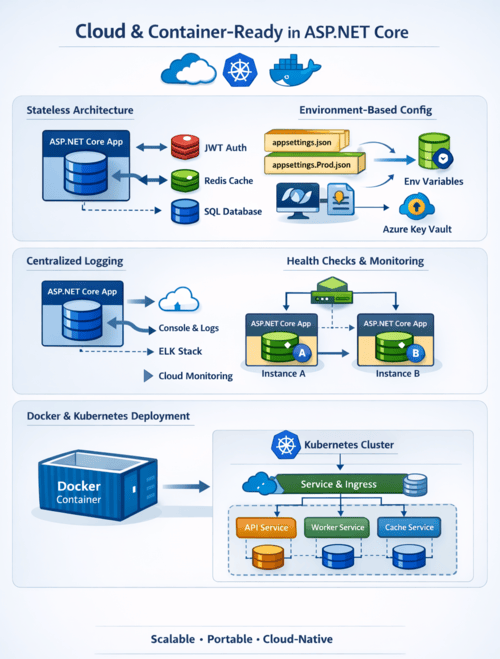
The following traits are usually present in an application that is prepared for the cloud and containers:
- Architecture without statues
- Externalized setup
- Behavior depends on the environment
- Organized logging
- Monitoring of health
- Quick startup and minimal memory usage
- Simple containerization
All of these ideas are naturally aligned with ASP.NET Core.
Lightweight, Cross-Platform Runtime
ASP.NET Core runs on .NET, which is:
- Cross-platform (Windows, Linux, macOS)
- High-performance
- Optimized for low memory usage
- Fast startup (critical for containers)
This makes ASP.NET Core an excellent choice for Docker containers, Kubernetes, and serverless platforms like Azure App Service or AWS ECS.
Stateless by Design
Cloud platforms scale applications horizontally by creating multiple instances. ASP.NET Core encourages stateless applications, meaning no session data or state is stored in memory.
Avoid In-Memory Session State
❌ Not cloud-friendly:
services.AddSession();
✅ Cloud-ready approach:
Store state in Redis
- Use JWT tokens
- Persist data in databases
- Example: JWT-Based Authentication
builder.Services.AddAuthentication("Bearer")
.AddJwtBearer(options =>
{
options.Authority = "https://auth.example.com";
options.Audience = "api";
});
This allows any container instance to handle any request.
Environment-Based Configuration
ASP.NET Core uses a layered configuration system, ideal for cloud deployments.
Supported Configuration Providers
- appsettings.json
- appsettings.{Environment}.json
- Environment variables
- Azure Key Vault
- Command-line arguments
Example: appsettings.json
{
"ConnectionStrings": {
"DefaultConnection": ""
}
}
Override via Environment Variable (Docker / Cloud)
ConnectionStrings__DefaultConnection=Server=db;Database=app;
ASP.NET Core automatically maps environment variables using double underscores (__), making it container-friendly by default.
Strong Support for Environment Separation
ASP.NET Core uses the ASPNETCORE_ENVIRONMENT variable:
ASPNETCORE_ENVIRONMENT=Production
Environment-Specific Behavior
if (app.Environment.IsDevelopment())
{
app.UseDeveloperExceptionPage();
}
else
{
app.UseExceptionHandler("/error");
}
This ensures safe production deployments without code changes.
Built-in Dependency Injection (DI)
Cloud-native applications depend heavily on loose coupling. ASP.NET Core includes a built-in DI container.
Example: Register Services
builder.Services.AddScoped<IEmailService, EmailService>();
Consume via Constructor Injection
public class NotificationController : ControllerBase
{
private readonly IEmailService _emailService;
public NotificationController(IEmailService emailService)
{
_emailService = emailService;
}
}
This improves:
- Testability
- Scalability
- Service replacement in cloud environments
Logging Optimized for Containers
Containers favor stdout/stderr logging, not file-based logs. ASP.NET Core integrates seamlessly with modern logging systems.
Default Logging (Console)
builder.Logging.ClearProviders();
builder.Logging.AddConsole();
Example Log Output
info: OrderService[0]
Order processed successfully
These logs can be collected by:
- Docker
- Kubernetes
- Azure Monitor
- ELK Stack
- AWS CloudWatch
Health Checks for Cloud Orchestration
Cloud platforms need to know whether an application is alive and ready.
Enable Health Checks
builder.Services.AddHealthChecks()
.AddSqlServer(builder.Configuration.GetConnectionString("Default"));
Map Health Endpoint
app.MapHealthChecks("/health");
Kubernetes Usage
livenessProbe:
httpGet:
path: /health
port: 80
This allows orchestrators to restart unhealthy containers automatically.
First-Class Docker Support
ASP.NET Core applications are easy to containerize.
Sample Dockerfile
FROM mcr.microsoft.com/dotnet/aspnet:8.0 AS base
WORKDIR /app
EXPOSE 80
FROM mcr.microsoft.com/dotnet/sdk:8.0 AS build
WORKDIR /src
COPY . .
RUN dotnet publish -c Release -o /app/publish
FROM base AS final
WORKDIR /app
COPY --from=build /app/publish .
ENTRYPOINT ["dotnet", "MyApp.dll"]
Build & Run
docker build -t myapp .
docker run -p 8080:80 myapp
ASP.NET Core’s fast startup time makes it ideal for auto-scaling scenarios.
Graceful Shutdown Handling
Containers can be stopped at any time. ASP.NET Core handles SIGTERM signals gracefully.
Background Service Example
public class Worker : BackgroundService
{
protected override async Task ExecuteAsync(
CancellationToken stoppingToken)
{
while (!stoppingToken.IsCancellationRequested)
{
await Task.Delay(1000, stoppingToken);
}
}
}
This ensures:
- Ongoing requests finish
- Resources are released properly
Kubernetes & Microservices Friendly
ASP.NET Core works exceptionally well in microservices architectures:
- Small API surface
- Minimal APIs support
- Independent deployments
- Service-to-service communication via HTTP/gRPC
Minimal API Example
var app = WebApplication.Create(args);
app.MapGet("/ping", () => "pong");
app.Run();
This results in:
- Faster startup
- Lower memory usage
- Smaller container images
Summary: Why ASP.NET Core Is Cloud-Native by Default
ASP.NET Core is not just cloud-compatible it is cloud-optimized.
Key Advantages
- Stateless, scalable design
- Environment-based configuration
- Built-in dependency injection
- Console-first structured logging
- Health checks for orchestration
- First-class Docker and Kubernetes support
- Fast startup and low resource usage
Whether you are deploying to Azure, AWS, GCP, or on-prem Kubernetes, ASP.NET Core provides everything needed to build modern, resilient, cloud-native applications.