User accounts must be protected from phishing, credential-stuffing, and password theft by modern web apps. Using Two-Factor Authentication (2FA) is one of the best techniques to improve authentication security. Modern apps are increasingly using Passkeys, which provide passwordless authentication based on the FIDO2/WebAuthn standard, in addition to more conventional 2FA techniques like email codes, SMS codes, and authenticator apps.
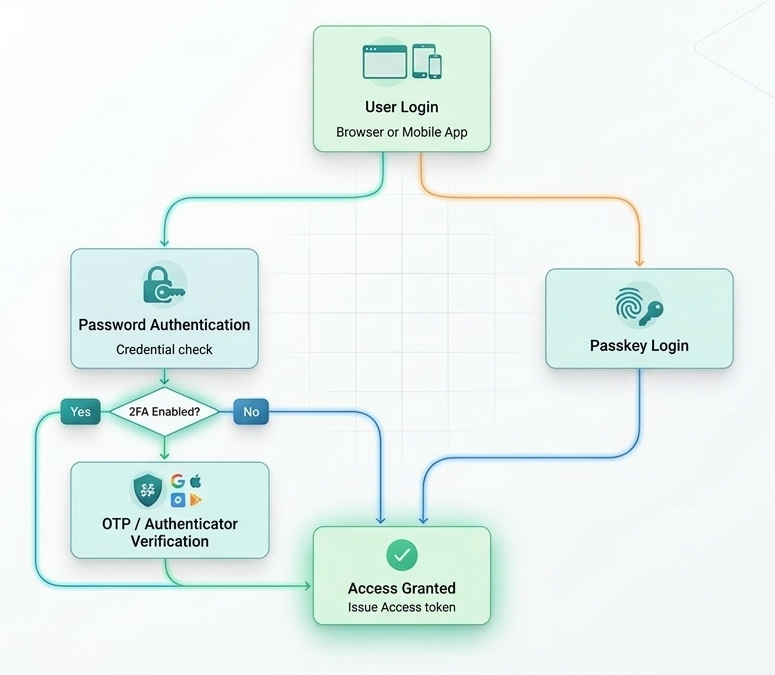
Hybrid Authentication Process: For a safe user experience, a single process that supports both contemporary, direct passkey login and conventional password-based entry with optional 2FA.
The Significance of Two-Factor Authentication
Passwords by themselves are no longer adequate for account security. Phishing, database leaks, and brute-force assaults are common ways for attackers to get passwords.
A second verification element is introduced by Two-element Authentication (2FA), which is usually classified as:

- Something you are familiar with, like a PIN or password
- You own a phone, an authenticator app, or a security key.
- Something you are: biometrics like Face ID or fingerprints
When 2FA is set, hackers cannot access the account without the second factor, even if a password is stolen.
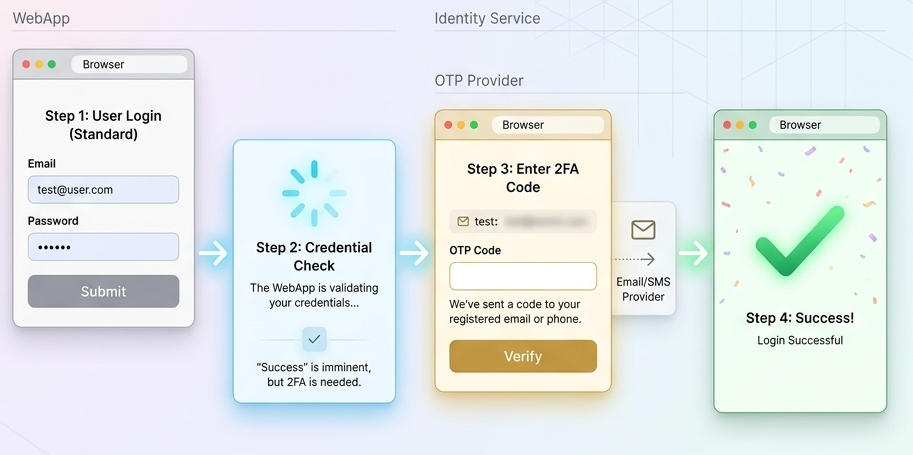
Two-Factor Authentication Flow: A multi-layered security process requiring a secondary OTP verification step to ensure protected user access.
2FA Methods in ASP.NET Core
ASP.NET Core Identity provides built-in support for several 2FA mechanisms:
- Email verification codes
- SMS verification codes
- Authenticator apps (TOTP)
- Recovery codes
During login, if 2FA is enabled, the authentication process is split into two steps.
Passkeys vs 2FA
| Feature | 2FA | Passkey |
|
Password required
|
Yes
|
No
|
|
User experience
|
Multi-step login
|
Single step
|
|
Security model
|
Shared secrets
|
Public-key cryptography
|
|
Phishing resistance
|
Moderate
|
Very high
|
|
Device integration
|
Authenticator apps
|
Biometrics, device security
|
Passkeys in ASP.NET Core
In ASP.NET Core, passkeys
Modern, passwordless, and phishing-resistant authentication methods are made possible by ASP.NET Core's support for passkey authentication based on the FIDO2/WebAuthn standard.
The Fido2 can be used to accomplish the implementation.A ready-to-use library for incorporating passkey registration and authentication routines into ASP.NET Core applications is provided by the AspNet package, which is accessible on NuGet.
Add package Fido to Dotnet.2. AspNet—version 4.0.0
Simple registration process:
Basic registration flow:
- User clicks Register Passkey
- Server generates a WebAuthn challenge
- Browser prompts biometric verification
- Device creates a cryptographic key pair
- Public key is stored on the server
Login flow:
- User selects Sign in with Passkey
- Browser prompts biometric verification
- Device signs the challenge using private key
- Server validates the signature
Security Best Practices
When implementing authentication systems in ASP.NET Core, follow these recommendations:
- Enable account lockout after multiple failed attempts
- Require email confirmation
- Store recovery codes securely
- Enforce HTTPS
- Log authentication events
- Allow users to manage 2FA/passkey methods from a dashboard
Conclusion
Two-Factor Authentication significantly improves account security by requiring additional verification beyond passwords. ASP.NET Core Identity provides built-in support for implementing multiple 2FA methods including email, SMS, and authenticator apps. However, the future of authentication is shifting toward passwordless systems like passkeys , which offer stronger protection against phishing and credential theft while improving user experience.
By combining 2FA with passkey authentication , developers can build modern, secure, and user-friendly authentication systems.