
May 22, 2015 07:59 by
 Peter
Peter
Today, I am going to tell you about ASP.NET How to get all file names in a folder using C#/VB.NET. Fisrt, create the new ASP.NET project and then write the following code:
using System;
using System.Collections.Generic;
using System.Linq;
using System.Web;
using System.Web.UI;
using System.Web.UI.WebControls;
using System.IO;
public partial class GetAllFileNames : System.Web.UI.Page
{
protected void Page_Load(object sender, EventArgs e)
{
string str = string.Empty;
str = str + "<ul>";
DirectoryInfo d = new DirectoryInfo(@"D:\TextFiles");//Assuming Test is your Folder
FileInfo[] Files = d.GetFiles("*.*"); //Getting Text files
foreach (FileInfo file in Files)
{
str = str+"<li>" + file.Name;
}
str = str + "</li></ul>";
Response.Write(str);
}
}

VB:
Imports System.Collections.Generic
Imports System.Linq
Imports System.Web
Imports System.Web.UI
Imports System.Web.UI.WebControls
Imports System.IO
Partial Public Class GetAllFileNames
Inherits System.Web.UI.Page
Protected Sub Page_Load(ByVal sender As Object, ByVal e As EventArgs)
Dim str As String = String.Empty
str = str & "<ul>"
Dim d As New DirectoryInfo("D:\TextFiles")
'Assuming Test is your Folder
Dim Files As FileInfo() = d.GetFiles("*.*")
'Getting Text files
For Each file As FileInfo In Files
str = str & "<li>" & file.Name
Next
str = str & "</li></ul>"
Response.Write(str)
End Sub
End Class
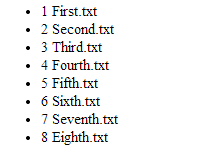
And here is the output from the above code:
Free ASP.NET 5 Hosting
Try our Free ASP.NET 5 Hosting today and your account will be setup soon! You can also take advantage of our Windows & ASP.NET Hosting support with Unlimited Domain, Unlimited Bandwidth, Unlimited Disk Space, etc.

May 18, 2015 07:11 by
Peter
In this short article, let me show you how to create two buttons "one for UP" and "one for DOWN" in the datagrid then you can easily move row up and down by using the following code.
Add code in Default.aspx page:
<asp:DataGrid ID="dgrdAdmin" runat="server" OnItemCommand="dgrdAdmin_ItemCommand" AllowSorting="true">
<Columns>
<asp:BoundColumn DataField="id" Visible="false"></asp:BoundColumn>
<asp:TemplateColumn>
<ItemTemplate>
<asp:ImageButton ID="imgbtnUP" runat="server" CommandName="Up" />
<asp:ImageButton ID="imgbtnDown" runat="server" CommandName="Down" />
</ItemTemplate>
</asp:TemplateColumn>
</Columns>
</asp:DataGrid>
Now, write the following code:
private int GetMaxSortOrder()
{
int max = 0;
DataTable dt = new DataTable();
SqlConnection conn = new SqlConnection("Your_Connection_String");
SqlCommand cmd = new SqlCommand("SELECT MAX(SORTORDER) FROM Your_Admin_Table");
conn.Open();
SqlDataAdapter sqad = new SqlDataAdapter(cmd);
sqad.Fill(dt);
if (dt.Rows.Count > 0)
{
if (dt.Rows[0][0].ToString() != "")
max = Convert.ToInt32(dt.Rows[0][0]);
}
return max;
}
protected void dgrdAdmin_ItemCommand(object sender, DataGridCommandEventArgs e)
{
if (e.Item.ItemType == ListItemType.Item || e.Item.ItemType == ListItemType.AlternatingItem)
{
if (e.CommandName.Equals("Up"))
{
int SortOrder = 0;
SqlConnection conn = new SqlConnection("Your_Connection_String");
if (e.Item.Cells[10].Text != "")
{
SortOrder = Convert.ToInt32(e.Item.Cells[10].Text);
if (SortOrder == 0)
{
DataTable dt = new DataTable();
SqlCommand cmd = new SqlCommand("SELECT id FROM Your_ADMIN_Table");
conn.Open();
SqlDataAdapter sqad = new SqlDataAdapter(cmd);
sqad.Fill(dt);
if (dt.Rows.Count > 0)
{
int count = 0;
foreach (DataRow dr in dt.Rows)
{
count++;
SqlCommand cmdUp = new SqlCommand("UPDATE Your_ADMIN_Table SET
SortOrder='" + count + "' WHERE id='" + dr["id"].ToString() + "'");
cmdUp.ExecuteNonQuery();
}
}
// bind your grid
return;
}
}
if (SortOrder == GetMaxSortOrder() || SortOrder > GetMaxSortOrder())
return;
SqlCommand cmd2 = new SqlCommand("UPDATE Your_ADMIN_Table SET
SortOrder='" + SortOrder + "' WHERE SortOrder='" + (SortOrder + 1) + "'");
cmd2.ExecuteNonQuery();
SqlCommand cmd3 = new SqlCommand("UPDATE Your_ADMIN_Table SET
SortOrder='" + (SortOrder + 1) + "' WHERE id='" + e.Item.Cells[1].Text + "' AND
SortOrder='" + SortOrder + "'");
cmd3.ExecuteNonQuery();
dgrdAdmin.DataSource = // Bind data in datagrid
dgrdAdmin.DataBind();
}
if (e.CommandName.Equals("Down"))
{
SqlConnection conn = new SqlConnection("Your_Connection_String");
int SortOrder = 0;
if (e.Item.Cells[10].Text != "")
{
SortOrder = Convert.ToInt32(e.Item.Cells[10].Text);
if (SortOrder == 0)
{
DataTable dt = new DataTable();
SqlCommand cmd = new SqlCommand("SELECT id FROM Your_ADMIN_Table");
conn.Open();
SqlDataAdapter sqad = new SqlDataAdapter(cmd);
if (dt.Rows.Count > 0)
{
int count = 0;
foreach (DataRow dr in dt.Rows)
{
count++;
SqlCommand cmdDown = new SqlCommand("UPDATE Your_ADMIN_Table SET
SortOrder='" + count + "' WHERE id='" + dr["id"].ToString() + "'");
cmdDown.ExecuteNonQuery();
}
}
// bind your grid
return;
}
}
if (SortOrder == 0)
return;
SqlCommand cmd1 = new SqlCommand("UPDATE Your_ADMIN_Table SET SortOrder=" + SortOrder + "' WHERE SortOrder='" + (SortOrder - 1) + "'");
cmd1.ExecuteNonQuery();
SqlCommand cmd2 = new SqlCommand("UPDATE Your_ADMIN_Table SET SortOrder='" + (SortOrder - 1) + "' WHERE id='" + e.Item.Cells[1].Text + "'
AND SortOrder='" + SortOrder + "'");
cmd2.ExecuteNonQuery();
dgrdAdmin.DataSource = // Bind data in datagrid
dgrdAdmin.DataBind();
}
}
}
Now you can easily move your datagrid row up and down with sorting.
Free ASP.NET 5 Hosting
Try our Free ASP.NET 5 Hosting today and your account will be setup soon! You can also take advantage of our Windows & ASP.NET Hosting support with Unlimited Domain, Unlimited Bandwidth, Unlimited Disk Space, etc.
May 11, 2015 08:12 by
Peter
In this tutorial, I will show you How to Open URL in New Window with Custom Height Width Example using AngularJS and ASP.NET 5. I using “$window.open” we will new popup browser window with custom size in AngularJS. Now, I will be able to explain how to open new browser window with custom height and width on button click using AngularJS.
Write the following code:
// Open New Child / Browser Window
$scope.openChildWindow = function () {
var left = screen.width / 2 - 200, top = screen.height / 2 – 250
$window.open('http://www.hostforlife.eu', '', "top=" + top + ",left=" + left + ",width=400,height=500")
}
This is the complete code:
<html xmlns="http://www.w3.org/1999/xhtml">
<head runat="server">
<title> How to Open URL in New Window with Custom Height Width Example using AngularJS and ASP.NET?</title>
<script src="https://ajax.googleapis.com/ajax/libs/angularjs/1.3.9/angular.min.js"></script>
<script type="text/javascript">
var myApp = angular.module('sampleapp', [])
myApp.controller("expressionController", function ($scope,$window) {
// Open New Child / Browser Window
$scope.openChildWindow = function () {
var left = screen.width / 2 - 200, top = screen.height / 2 – 250
$window.open('http://www.hostforlife.eu', '', "top=" + top + ",left=" + left +
,width=400,height=500")
}
});
</script>
</head>
<body>
<form id="form1" runat="server">
<div data-ng-app="sampleapp" data-ng-controller="expressionController">
<input type="button" value="Open Popup Window" ng-click="openChildWindow()"/> <br /><br />
</div>
</form>
</body>
</html>
Free ASP.NET 5 Hosting
Try our Free ASP.NET 5 Hosting today and your account will be setup soon! You can also take advantage of our Windows & ASP.NET Hosting support with Unlimited Domain, Unlimited Bandwidth, Unlimited Disk Space, etc.
May 8, 2015 07:57 by
Peter
In this article, let me show you how to create a responsive page using BootStrap in ASP.NET. First of all, you must download BootStrap from bootstrap.com. Next step, Open your Visual Studio, add your downloaded file into your project then create the index.aspx page and call your necessary files with in the head tag from that downloaded folder.
Then, write the following code:
<head runat="server">
<title></title>
<script src="https://ajax.googleapis.com/ajax/libs/jquery/1.11.2/jquery.min.js"></script>
<script src="js/bootstrap.min.js"></script>
<link href="css/bootstrap.min.css" rel="stylesheet" />
</head>
Consider <div class="row"></div> as a new line. Whatever you want to design in a row you should design with in a <div class="row">Your design</div>. And then <div class="col-lg-12"></div>
<div class="row">
<div class="col-lg-12">
Your Design
Create a Responsive Page Using BootStrap in ASP.NET
</div>
</div>
Full Code Sample
<%@ Page Language="C#" AutoEventWireup="true" CodeBehind="index.aspx.cs" Inherits="Responsive_Website.index" %>
<!DOCTYPE html>
<html
xmlns="http://www.w3.org/1999/xhtml">
<head runat="server">
<title></title>
<script src="https://ajax.googleapis.com/ajax/libs/jquery/1.11.2/jquery.min.js"></script>
<script src="js/bootstrap.min.js"></script>
<link href="css/bootstrap.min.css" rel="stylesheet" />
</head>
<body>
<form id="form1" runat="server">
<div class="container">
<div class="row">
<div class="col-lg-3"></div>
<div class="col-lg-6">
<form class="form-signin">
<h2 class="form-signin-heading">Please sign in</h2>
<label for="inputEmail" class="sr-only">Email address</label>
<input type="email" id="inputEmail" class="form-control" placeholder="Email
ddress" required autofocus>
<label for="inputPassword" class="sr-only">Password</label>
<input type="password" id="inputPassword" class="form-control"
laceholder="Password" required>
<div class="checkbox">
<label>
<input type="checkbox" value="remember-me">
Remember me
</label>
</div>
<button class="btn btn-lg btn-primary btn-block" type="submit">Sign in</button>
</form>
</div>
<div class="col-lg-3"></div>
</div>
</div>
</form>
</body>
</html>
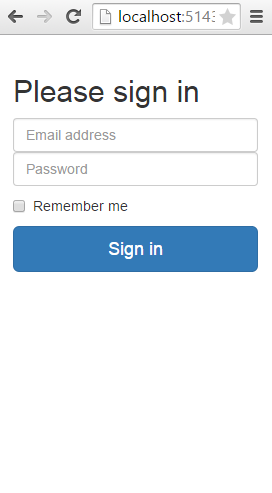
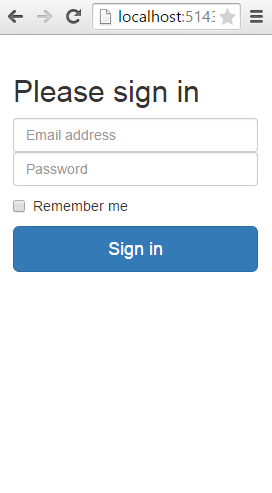
And here is the output from the above code:
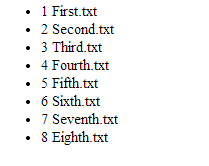
Output (on small screens)
Free ASP.NET Hosting
Try our Free ASP.NET Hosting today and your account will be setup soon! You can also take advantage of our Windows & ASP.NET Hosting support with Unlimited Domain, Unlimited Bandwidth, Unlimited Disk Space, etc.
May 4, 2015 08:41 by
Peter
In this post, I will tell you about using the MathCap for ASP.NET 5. MathCap is a plugin for ASP.NET application and its a 100% effective and simple to use. The more you see on a profound look. Here i imparted is the base form of Mathcap 1.0.0. More highlight are going ahead a newer versions. And now you must add mathcapp dll reference.

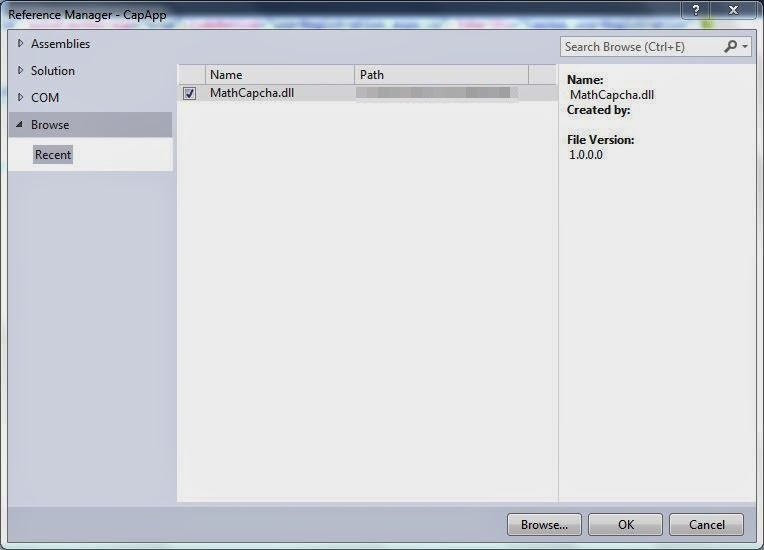
Remove the namespace on the webpage using MathCapcha;
Now write the following code
var bitmapImage = new Capcha();
var properties = new MathCapchaProperties();
Now, it is time to customise the properties.
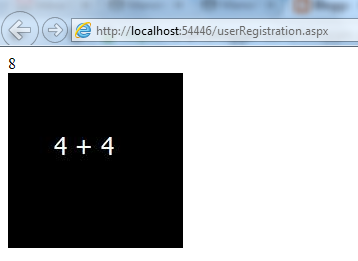
Now get the response and point to image control, using below code:
var imgur = bitmapImage.CreateThumbnail(properties);
img.Src = imgur.bmpImageSource;
Response.Write(imgur.answer);
And here is the output:
Free ASP.NET Hosting
Try our Free ASP.NET Hosting today and your account will be setup soon! You can also take advantage of our Windows & ASP.NET Hosting support with Unlimited Domain, Unlimited Bandwidth, Unlimited Disk Space, etc.

April 17, 2015 07:11 by
Peter
In this post i will be able to show you how to discover loop in linked list with ASP.NET C#. We can notice the loop within the coupled list via Floyd’s Cycle-Finding formula, explained here. The method is pretty simple: We have a tendency to begin at the start of the linked list with 2 pointers. The primary pointer is incremented through every node of the list. The second pointer moves twice as quick, and skips each other node. If the coupled list contains a loop, these 2 pointers can eventually meet at the same node, so indicating that the linked list contains a loop.
using System;
using System.Collections.Generic;
using System.Linq;
using System.Text;
using System.Threading.Tasks;
namespace Algo
{
public class Node
{
public Node Next { get; set; }
public int Value { get; set; }
public Node(int value)
{
this.Value = value;
}
}
public class LinkedList
{
private Node _head;
public LinkedList()
{
}
public void AppendLast(Node newNode)
{
if (_head == null)
{
_head = newNode;
}
else
{
Node current = _head;
while (current.Next != null)
{
current = current.Next;
}
current.Next = newNode;
}
}
public override string ToString()
{
Node current = _head;
StringBuilder builder = new StringBuilder();
while (current != null)
{
builder.Append(current.Value + "->");
current = current.Next;
}
return builder.ToString();
}
public bool IsCycle()
{
Node slow = _head;
Node fast = _head;
while (fast != null && fast.Next != null)
{
fast = fast.Next.Next;
slow = slow.Next;
if (slow == fast)
return true;
}
return false;
}
}
class Program
{
static void Main(string[] args)
{
LinkedList list = new LinkedList();
list.AppendLast(new Node(10));
list.AppendLast(new Node(20));
list.AppendLast(new Node(30));
Node cycle = new Node(40);
list.AppendLast(cycle);
list.AppendLast(new Node(60));
list.AppendLast(cycle);
if (list.IsCycle())
{
Console.WriteLine("Linked List is cyclic as it contains cycle or loop");
}
else
{
Console.WriteLine("LinkedList is not cyclic, no loop or cycle found");
}
}
}
}
Free ASP.NET Hosting
Try our Free ASP.NET Hosting today and your account will be setup soon! You can also take advantage of our Windows & ASP.NET Hosting support with Unlimited Domain, Unlimited Bandwidth, Unlimited Disk Space, etc. You will not be charged a cent for trying our service for the next 3 days. Once your trial period is complete, you decide whether you'd like to continue.
April 13, 2015 12:17 by
Peter
In this tutorial, I will show you how to Displaying SubTotal & Grand Total in ASP.NET 5. First, create new project. The records are isolated into Groups and after that SubTotal is calculated for every Group and then shown utilizing an element Row as a part of GridView. Now , I write the following code to create Products table:
CREATE TABLE [dbo].[Products](
[ProductID] [int] NULL,
[ProductName] [varchar](100) NULL,
[CategoryID] [int] NULL,
[UnitPrice] [decimal](18, 0) NULL,
[QuantityPerUnit] [varchar](100) NULL
) ON [PRIMARY]
GO
First create new web apps and open your GridViewSubTotalTotal.aspx and write the following code:
<html xmlns="http://www.w3.org/1999/xhtml">
<head runat="server">
<title> Displaying SubTotal & Grand Total in ASP.NET 5</title>
</head>
<body>
<form id="form1" runat="server">
<h3 style="color:Green">Display SubTotal and Grand Total in ASP.Net GridView</h3>
<div>
<asp:GridView ID="gvData" runat="server" BackColor="White" BorderColor="#CC9966"
AutoGenerateColumns="false" BorderStyle="Solid" BorderWidth="1px" CellPadding="4"
Font-Names="Tahoma" Font-Size="Small" Width="475px" OnRowCreated="gvData_RowCreated"
nDataBound="gvData_OnDataBound">
<Columns>
<asp:BoundField DataField="ProductID" HeaderText="ProductID" />
<asp:BoundField DataField="CategoryID" HeaderText="Category ID" />
<asp:BoundField DataField="ProductName" HeaderText="ProductName" />
<asp:BoundField DataField="Price" HeaderText="Price" DataFormatString="{0:N2}"/>
</Columns>
<FooterStyle BackColor="Tan" />
<AlternatingRowStyle BackColor="#E6E6E1" />
<FooterStyle BackColor="#FFFFCC" ForeColor="#330099" />
<HeaderStyle BackColor="#990000" Font-Bold="True" ForeColor="#FFFFCC" />
</asp:GridView>
</div>
</form>
</body>
</html>
Next step, write the code below: GridViewSubTotalTotal.aspx.cs:
using System.Data;
using System.Data.SqlClient;
using System.Configuration;
using System.Drawing;
public partial class GridViewSubTotalTotal : System.Web.UI.Page
{
protected void Page_Load(object sender, EventArgs e)
{
if (!IsPostBack)
{
BindGridData();
}
}
protected void BindGridData()
{
SqlConnection con = new SqlConnection(ConfigurationManager.ConnectionStrings["ConString"].ConnectionString);
string sqlQuery = "SELECT ProductID,ProductName,CategoryID,(UnitPrice*QuantityPerUnit) AS Price FROM Products";
sqlQuery = sqlQuery + " WHERE CategoryID in(1,2,3) ORDER BY ProductID ASC";
SqlCommand cmd = new SqlCommand(sqlQuery, con);
SqlDataAdapter da = new SqlDataAdapter(cmd);
DataSet ds = new DataSet();
da.Fill(ds);
gvData.DataSource = ds;
gvData.DataBind();
}
int currentId = 0;
decimal subTotal = 0;
decimal total = 0;
int subTotalRowIndex = 0;
protected void gvData_RowCreated(object sender, GridViewRowEventArgs e)
{
subTotal = 0;
if (e.Row.RowType == DataControlRowType.DataRow)
{
DataTable dt = (e.Row.DataItem as DataRowView).DataView.Table;
int ProductID = Convert.ToInt32(dt.Rows[e.Row.RowIndex]["ProductID"]);
total += Convert.ToDecimal(dt.Rows[e.Row.RowIndex]["Price"]);
if (ProductID != currentId)
{
if (e.Row.RowIndex > 0)
{
for (int i = subTotalRowIndex; i < e.Row.RowIndex; i++)
{
subTotal += Convert.ToDecimal(gvData.Rows[i].Cells[3].Text);
}
this.AddTotalRow("Sub Total", subTotal.ToString("N2"));
subTotalRowIndex = e.Row.RowIndex;
}
currentId = ProductID;
}
}
}
private void AddTotalRow(string labelText, string value)
{
GridViewRow row = new GridViewRow(0, 0, DataControlRowType.DataRow, DataControlRowState.Normal);
row.BackColor = ColorTranslator.FromHtml("#FFA500");
row.Cells.AddRange(new TableCell[4] {new TableCell { Text = labelText, HorizontalAlign = HorizontalAlign.Right},
new TableCell (),
new TableCell(), //Empty Cell,
new TableCell { Text = value, HorizontalAlign = HorizontalAlign.Right }
);
row.Cells[0].BorderColor = System.Drawing.Color.Orange;
row.Cells[1].BorderColor = System.Drawing.Color.Orange;
row.Cells[2].BorderColor = System.Drawing.Color.Orange;
row.Cells[3].BorderColor = System.Drawing.Color.Orange;
gvData.Controls[0].Controls.Add(row);
}
protected void gvData_OnDataBound(object sender, EventArgs e)
{
for (int i = subTotalRowIndex; i < gvData.Rows.Count; i++)
{
subTotal += Convert.ToDecimal(gvData.Rows[i].Cells[3].Text);
}
this.AddTotalRow("Sub Total", subTotal.ToString("N2"));
this.AddTotalRow("Total", total.ToString("N2"));
}
}
I hope this tutorial works for you!
Free ASP.NET 5 Hosting
Try our Free ASP.NET 5 Hosting today and your account will be setup soon! You can also take advantage of our Windows & ASP.NET Hosting support with Unlimited Domain, Unlimited Bandwidth, Unlimited Disk Space, etc. You will not be charged a cent for trying our service for the next 3 days. Once your trial period is complete, you decide whether you'd like to continue.
April 10, 2015 07:46 by
Peter
ASP.NET will gives you adaptability by they way you connect with databases. It would be ideal if you include the following code in your aspx page and check how to get connection on .aspx page. And here is the code that I used:

<%@ Page Language="C#" AutoEventWireup="true" CodeFile="onpageconnection.aspx.cs" Inherits="onpageconnection" %>
<!DOCTYPE html PUBLIC "-//W3C//DTD XHTML 1.0 Transitional//EN" "http://www.w3.org/TR/xhtml1/DTD/xhtml1-transitional.dtd">
<%@ Import Namespace="System.Data.OleDb" %>
<%@ Import Namespace="System.Data.SqlClient" %>
<%@ import Namespace="System.Data" %>
<script runat="server">
protected void Page_Load(object sender, EventArgs e)
{
try
{
System.Data.SqlClient.SqlConnection con;
sqlconn objconn = new sqlconn();
con = objconn.getcon();
con.Open();
String str = "select * from EmpDemo";
//SqlCommand cmd = new SqlCommand(str,con);
//SqlDataReader adp;
SqlDataAdapter adp = new SqlDataAdapter(str,con);
DataSet ds = new DataSet();
adp.Fill(ds);
GridView1.DataSource = ds;
GridView1.DataBind();
//Response.Write("connection open");
}
catch (Exception ex)
{
Response.Write(ex.Message);
}
}
</script>
<html>
<head>
<title></title>
</head>
<body>
<form id="Form1" runat="server">
<asp:GridView ID="GridView1" runat="server">
</asp:GridView>
</form>
</body>
</html>
HostForLIFE.eu ASP.NET 5 Hosting
HostForLIFE.eu is European Windows Hosting Provider which focuses on Windows Platform only. We deliver on-demand hosting solutions including Shared hosting, Reseller Hosting, Cloud Hosting, Dedicated Servers, and IT as a Service for companies of all sizes. We have customers from around the globe, spread across every continent. We serve the hosting needs of the business and professional, government and nonprofit, entertainment and personal use market segments.
March 23, 2015 12:10 by
Peter
In this post, I will tell you about Anti Forgery Tokens with AngularJS and ASP.NET 5. Single Page Applications utilizing AngularJS with ASP.NET by default leave our Web API methods open to forgery abuse. A couple of straightforward steps will permit you to include hostile to phony security. The primary step will be to make a custom activity channel ascribe to test our answer which you can use to finish web programming interface classes or individual activities.

using System;
using System.Linq;
using System.Net.Http;
using System.Web.Helpers;
using System.Web.Http.Filters;
namespace antiforgery
{
public sealed class ValidateCustomAntiForgeryTokenAttribute : ActionFilterAttribute
{
public override void OnActionExecuting(System.Web.Http.Controllers.HttpActionContext actionContext)
{
if (actionContext == null)
{
throw new ArgumentNullException("actionContext");
}
var headers = actionContext.Request.Headers;
var cookie = headers
.GetCookies()
.Select(c => c[AntiForgeryConfig.CookieName])
.FirstOrDefault();
var tokenFromHeader = headers.GetValues("X-XSRF-Token").FirstOrDefault();
AntiForgery.Validate(cookie != null ? cookie.Value : null, tokenFromHeader);
base.OnActionExecuting(actionContext);
}
}
}
The web API classes or methods will need decorating appropriately to ensure this code is run, i.e.
[ValidateCustomAntiForgeryTokenAttribute]
The following step is to verify ASP.NET includes its standard forgery token cookie and hidden field in the markup. Include the accompanying line into the markup.
@Html.AntiForgeryToken();
Presently, we have to redesign our AngularJS code to pass anti forgery token back in the header with all our web API calls. The most straightforward approach to do this is to situated a default up in the run system for the AngularJS application module, e.g.
.run(function($http) {
$http.defaults.headers.common['X-XSRF-Token'] =
angular.element('input[name="__RequestVerificationToken"]').attr('value');
})
HostForLIFE.eu ASP.NET 5 Hosting
HostForLIFE.eu is European Windows Hosting Provider which focuses on Windows Platform only. We deliver on-demand hosting solutions including Shared hosting, Reseller Hosting, Cloud Hosting, Dedicated Servers, and IT as a Service for companies of all sizes. We have customers from around the globe, spread across every continent. We serve the hosting needs of the business and professional, government and nonprofit, entertainment and personal use market segments.

March 20, 2015 08:18 by
Peter
In this post, I will tell you how to extend ASP.NET 5 configuration settings with XML configuration elements of your own. To do this, you make a custom configuration section handler. The handler must be a .NET Framework class that inherits from the System.Configuration.ConfigurationSection class. The area handler translates and forms the settings that are characterized in XML design components in a particular area of a Web.config file. You can read and write these settings through the handler's properties.
And now, write the following code:
using System;
using System.Collections.Generic;
using System.Configuration;
using System.Linq;
using System.Web;
namespace CustomConfigSection
{
public class LoginRedirectByRoleSection : ConfigurationSection
{
[ConfigurationProperty("roleRedirects")]
public RoleRedirectCollection RoleRedirects
{
get
{
return (RoleRedirectCollection)this["roleRedirects"];
}
set
{
this["roleRedirects"] = value;
}
}
}
public class RoleRedirect : ConfigurationElement
{
[ConfigurationProperty("role", IsRequired = true)]
public string Role
{
get
{
return (string)this["role"];
}
set
{
this["role"] = value;
}
}
[ConfigurationProperty("url", IsRequired = true)]
public string Url
{
get
{
return (string)this["url"];
}
set
{
this["url"] = value;
}
}
}
public class RoleRedirectCollection : ConfigurationElementCollection
{
public RoleRedirect this[int index]
{
get
{
return (RoleRedirect)BaseGet(index);
}
}
public RoleRedirect this[object key]
{
get
{
return (RoleRedirect)BaseGet(key);
}
}
protected override ConfigurationElement CreateNewElement()
{
return new RoleRedirect();
}
protected override object GetElementKey(ConfigurationElement element)
{
return ((RoleRedirect)element).Role;
}
}
}
<configSections>
<section name="loginRedirectByRole" type="CustomConfigSection.LoginRedirectByRoleSection,CustomConfigSection" allowLocation="true" allowDefinition="Everywhere" />
</configSections>
<loginRedirectByRole>
<roleRedirects>
<add role="Administrator" url="~/Admin/Default.aspx" />
<add role="User" url="~/User/Default.aspx" />
</roleRedirects>
</loginRedirectByRole>
using System;
using System.Collections.Generic;
using System.Configuration;
using System.Linq;
using System.Web;
using System.Web.Security;
using System.Web.UI;
using System.Web.UI.WebControls;
using CustomConfigSection;
namespace CustomConfigSection
{
public partial class WebForm1 : System.Web.UI.Page
{
protected void Page_Load(object sender, EventArgs e)
{
LoginRedirectByRoleSection roleRedirectSection = (LoginRedirectByRoleSection)ConfigurationManager.GetSection("loginRedirectByRole");
foreach (RoleRedirect roleRedirect in roleRedirectSection.RoleRedirects)
{
if (Roles.IsUserInRole("", roleRedirect.Role))
{
Response.Redirect(roleRedirect.Url);
}
}
}
}
}
HostForLIFE.eu ASP.NET 5 Hosting
HostForLIFE.eu is European Windows Hosting Provider which focuses on Windows Platform only. We deliver on-demand hosting solutions including Shared hosting, Reseller Hosting, Cloud Hosting, Dedicated Servers, and IT as a Service for companies of all sizes. We have customers from around the globe, spread across every continent. We serve the hosting needs of the business and professional, government and nonprofit, entertainment and personal use market segments.